
Better Text Rendering (Gnome Hi-DPI)
Sets font hinting to "slight" and antialiasing to "standard".
Append changes (cli)
dconf write /org/gnome/desktop/interface/font-antialiasing "'grayscale'"
dconf write /org/gnome/desktop/interface/font-hinting "'slight'"
Append changes (Gnome Tweaks)
Fonts > Rendering > Hinting --> slight
Fonts > Rendering > Antialiasing --> Standard Grayscale
Reset changes (cli)
dconf reset /org/gnome/desktop/interface/font-antialiasing
dconf reset /org/gnome/desktop/interface/font-hinting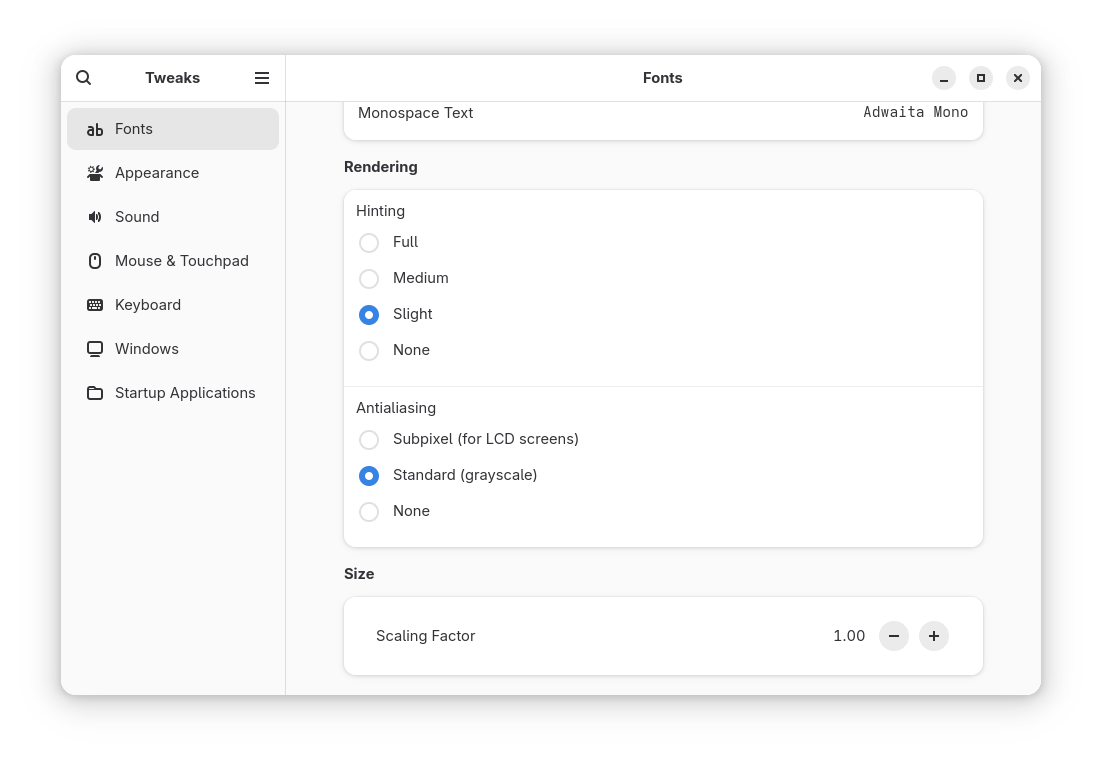
Contributors


Changelog
12/9/25, 9:25 PM
View All Changelog
54c8f-on26c5a-on02788-one218b-on2a578-on8c1a0-on777c6-on