
Firefox Advanced Settings Tweaks (user.js)
Tips
This guide will walk you through a few changes you can make to your user.js that will make your Firefox-based experience of Linux much more polished.
Preview
This is what your user.js would look like if you decide to apply all tweaks mentioned in this guide. The following user.js contains all modifications mentioned in this guide.
// Scrolling
user_pref("mousewheel.default.delta_multiplier_x", 200); // 100
user_pref("mousewheel.default.delta_multiplier_y", 200); // 100
user_pref("mousewheel.default.delta_multiplier_z", 200); // 100
user_pref("general.autoScroll", true); // false

user_pref("apz.fling_friction", "0.005"); // "0.002"
user_pref("apz.gtk.pangesture.delta_mode", 2); // 0
user_pref("apz.gtk.pangesture.pixel_delta_mode_multiplier", "7"); // "40.0"
user_pref("apz.overscroll.enabled", true); // true, for linux

// Other Settings
user_pref("browser.tabs.hoverPreview.enabled", true); // false
// Zen Browser–specific settings
user_pref("zen.splitView.change-on-hover", true); // false
user_pref("zen.view.compact.hide-toolbar", true); // false
user_pref("zen.view.compact.toolbar-flash-popup", false); // false
user_pref("zen.view.show-newtab-button-top", false); // true
user_pref("zen.workspaces.separate-essentials", false); // true
How to append changes
Method 1: user.js config file (faster)
Create a
user.jsby typing "about:support" into your browser and clicking "Open Directory" in the Profile Directory row.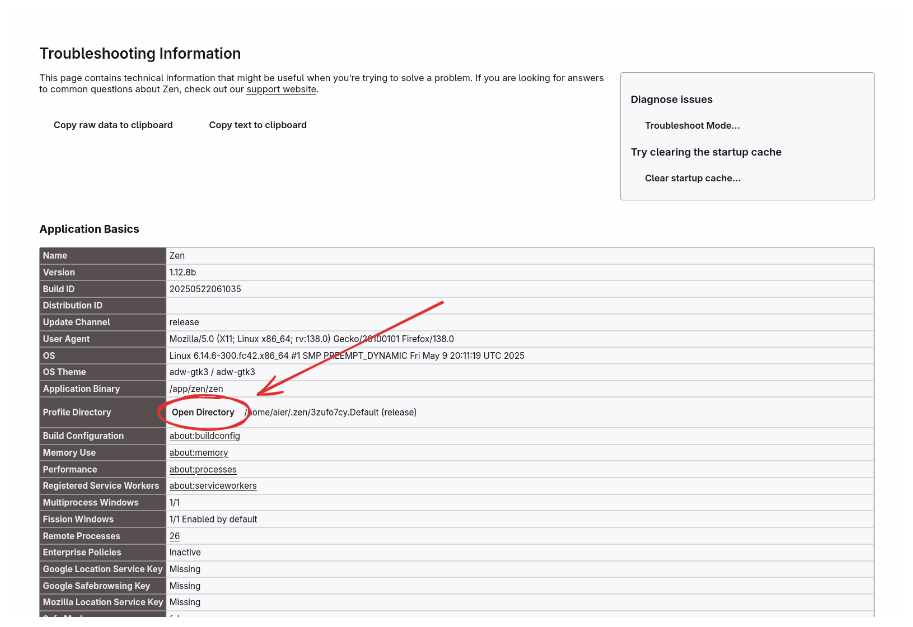
Inside your profile folder, you can create a file named
user.jsif it does not exist already. You can append changes from this guide intouser.js.
Method 2: "about:config"
Type in "about:config" into your browser and you'll be taken to the Firefox advanced preference page. Press "Accept risk and continue".
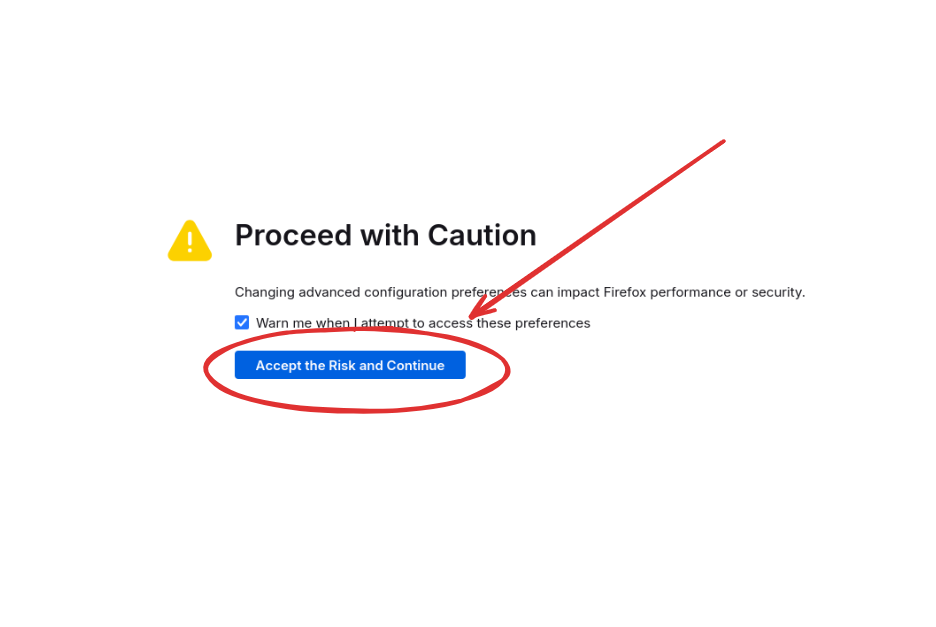
You can then type in the search bar the preference mentioned in the guide, edit the values of the preference, and create the reference if it doesn't exist.
Improving Scrolling
Many Firefox users (us included) feel that the Firefox default scrolling is quite slow on the mousewheel, or too fast on the trackpad, or not smooth enough, or not dynamic enough.
However you want your scrolling, hopefully you can customize the options we'll provide you to suit your needs.
Mousewheel scrolling
Mousewheel speed
The mousewheel scrolling is too slow for our suiting, we can adjust this with the mousewheel delta multiplier.
user_pref("mousewheel.default.delta_multiplier_x", 200); // 100
user_pref("mousewheel.default.delta_multiplier_y", 200); // 100
user_pref("mousewheel.default.delta_multiplier_z", 200); // 100
The default values of different flavors of Firefox may differ, but on default Firefox it is 100, and it tends to be quite slow. 200 fits our needs.
Autoscroll
You may want to enable middle mouse button scrolling a.k.a. autoscroll (it is disabled on Linux by default).
user_pref("general.autoScroll", true); // falseTrackpad scrolling
The touchpad scrolling tends to be way too fast on Linux, let's slow it down and make it more similar to what we'd find on Windows or Mac.
user_pref("apz.fling_friction", "0.005"); // "0.002"
user_pref("apz.gtk.pangesture.delta_mode", 2); // 0
user_pref("apz.gtk.pangesture.pixel_delta_mode_multiplier", "7"); // "40.0"
user_pref("apz.overscroll.enabled", true); // true, for linux- apz.fling_friction determines how quickly the scrolling slows down.
- apz.gtk.pangesture.delta_mode set to 2 (pixel mode) ensures that scrolling takes into account display scaling (useful if you are not using 100% scaling).
- apz.gtk.pangesture.pixel_delta_mode_multiplier determines the speed of the touchpad scrolling in pixel mode. It is recommended that you set the mousewheel delta multipliers first before this value, as this value applies only to trackpads, whereas the mousewheel delta multipliers apply to both mouse and trackpad.
- apz.overscroll.enabled set to true makes the page elastic as you reaches its end, making it feel more alive.
Other settings
Hover to see preview of tab
user_pref("browser.tabs.hoverPreview.enabled", true); // falseZen Browser–specific settings
If you are using Zen Browser, you can check out these settings:
user_pref("zen.splitView.change-on-hover", true); // false
user_pref("zen.view.compact.hide-toolbar", true); // false
user_pref("zen.view.compact.toolbar-flash-popup", false); // false
user_pref("zen.view.show-newtab-button-top", false); // true
user_pref("zen.workspaces.separate-essentials", false); // true- zen.splitView.change-on-hover set to true changes focus on split tabs without having to use a mouse click, similar to how Linux window managers change focus.
- zen.view.compact.hide-toolbar set to true hides the url toolbar if you are using multiple toolbars in your Appearance settings.
- zen.view.compact.toolbar-flash-popup set to false disables the tab bar from popping up in compact mode when switching tabs.
- zen.view.show-newtab-button-top sets the new tabs button to be at the bottom of tabs instead of being fixed below pinned tabs.
- zen.workspaces.separate-essentials allows essentials to be workspace independent (like how they used to be—you will see all your essentials regardless of what workspace you are in).
Contributors


Changelog
b7cae-on54c8f-on5810a-on26c5a-ond4310-oneebdc-on0ab32-on0228f-on6f292-on46131-onb8933-on8b341-one2f6b-ondaeb8-on686d1-on357ef-on0e14f-on573fd-on62c4b-on731c5-on0ed49-on41f78-on25920-on64610-ond95ee-ona154c-on78ee4-on63f60-onfb788-onac353-on85907-on718fb-on